ALEXIA WUNDER
Downloading Medical Records
As part of VA’s Digital Health Modernization strategy, our team transitioned the medical records experience on My HealtheVet to VA.gov.
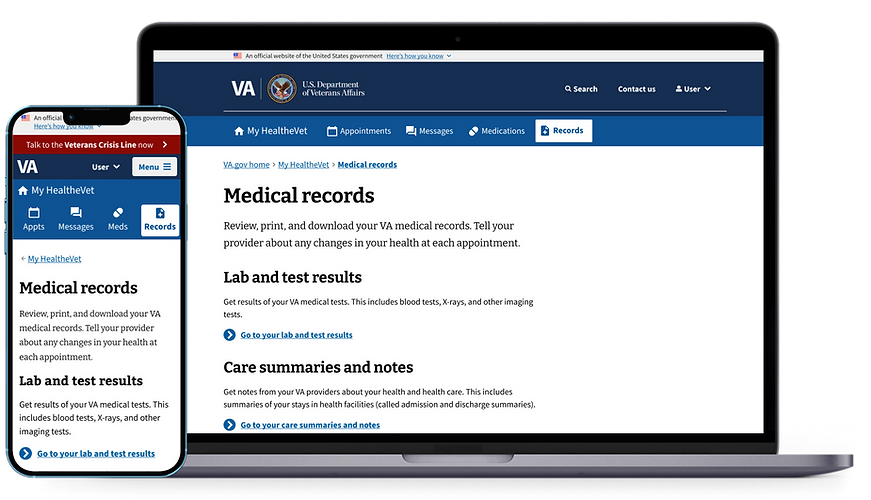
The goal: Give Veterans a simple, accessible way to view and download their records without sifting through thousands of pages.
THE PROJECT
My Role
UX Design Lead
The Team
-
2 designers
-
Accessibility specialist
-
Research team
-
10 engineers
Duration
12 weeks to MVP
Tools
-
Sketch
-
Figma
-
Mural
THE VETERANS
Audience: Over 9 million Veterans, with a large proportion of baby boomers
Needs: Simple access to complex data, inclusive for Veterans with physical and cognitive disabilities
Challenge: Prior design was non-compliant with WCAG/508 and inaccessible to assistive technology users

THE PROBLEM
Download-Only
-
Veterans couldn't view records on the site. They had to view their reports through an on screen PDF previewer that didn't work with assistive technology.
-
Downloaded PDF reports were incompatible with screen readers.
Overwhelming Options
The legacy site used a form with 49 checkboxes to generate Veteran medical records in a PDF format, potentially with thousands of pages.
Ambiguous Navigation
-
Health records spanned 12 categories with inconsistent structure.
-
Self-entered records were included in the web UI and downloadable reports. Unfortunately, Veterans incorrectly assumed self-entered records could be viewed by their health care team.
THE SOLUTION
Download-Optional
-
Veterans (including those who use assistive tech) can now view records on the page, without being required to download.
-
PDF reports are now compatible with screen readers.
Simple Selections
The 49 checkboxes have been reduced to 11 options with Plain Language descriptions.
Intuitive Navigation
-
Health records are now restructured from 12 categories down to 8 types of records with consistent formatting.
-
Detached self-entered records from the official medical record to prevent confusion.
-
Retired self-entered reporting in the UI, instead offering a historical report that includes data previously entered by Veterans.
DESIGN PROCESS

Research and Discovery
-
Participated in user interviews conducted by the client
-
Reviewed legacy usage patterns and pain points
-
Audited VA Design System for gaps
Early Concepts and Collaboration
-
Developed low-fidelity wireframes for iterative feedback
-
Ran co-design sessions with VA partners

High-Fidelity Prototypes and Accessibility Audit
-
Created clickable prototypes for usability testing
-
Worked closely with accessibility specialist to ensure WCAG and 508 compliance


Testing, Iteration & Validation
-
Participated in testing sessions and synthesis of findings
-
Flattened the navigation for easier findability
-
Refined the domain structure from 12 categories to 8 digestible domains
Recommendation based on usability test results. Research and analysis conducted by Anne Kennedy.

Landing page iteration with flattened navigation

BEFORE AND AFTER
Before

After


OUTCOME AND IMPACT
Launched to 100% of authenticated users by Dec 2024
Achieved full WCAG 2.1 AA and 508 compliance
Reduced processing time from hours to near-instant
Veterans can now view or download their records on demand

Overall, usability testing showed faster navigation, better findability, and clear user preference for direct record access over Blue Button reports.


